予約申込は
こちら

地域連携公共ライドシェア 筑波山エリア

お知らせ

お知らせ

  • 重要

    3月4日(水) WEBアプリのUI変更実施

    平素より地域連携公共ライドシェアをご利用いただき、誠にありがとうございます。
    皆さまにより快適にサービスをご利用いただけるよう、3月4日(水)にWEBアプリのUI(画面デザイン)変更作業を実施いたしました。

    こちらに伴い、本ページ中~下段の「サービス利用の流れ」内の「会員登録方法」「予約申込方法」をクリックした際のマニュアルについても、新UIに仕様変更しております。
    ※本ページ中段の「利用方法(How to use)」内の「02.WEBアプリで予約申込」に掲載している旧UIのイメージについては、別途刷新予定です。

    今後も、皆さまにとってより快適で安心なサービスを提供できるよう努めてまいります。
    引き続き「地域連携公共ライドシェア」をよろしくお願い申し上げます。

  • お知らせ

    予約成立時・キャンセル確定時の「通知メール配信」開始のお知らせ

    【サービス詳細】
    ■サービス内容
    予約成立時、およびキャンセル確定時の通知メール自動配信
    ■開始日
    令和8年2月26日(木)15時頃
    ■通知メール送信元
    「@mobi-jp.com」ドメインから送信
    ※あらかじめ受信許可設定をお願いいたします

    受信設定についてのお願い
    通知メールが「迷惑メールフォルダ」に振り分けられないよう、事前にドメイン指定受信の設定をご確認ください。

運行エリア

筑波山エリア

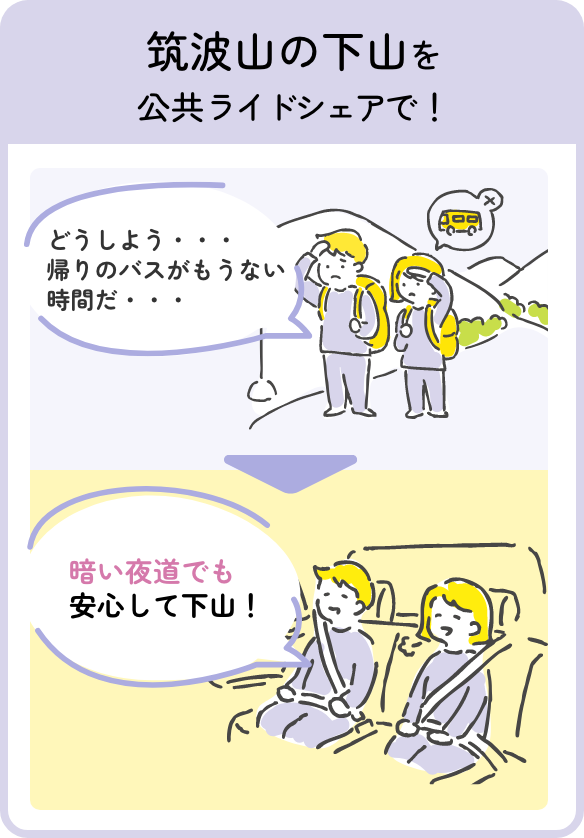
ご利用シーン

運賃表

事前申込、直前申込共通
おとな
1,000
こども
(小学生)
500
幼児
(未就学児)
無料

※おひとり様1回の乗車運賃

※事前申込は乗合の可能性あり、直前申込は乗合なし

※決済方法は現金またはPayPay(降車時)、
クレジットカード(予約申込時)

※降車時にお支払い

サービス概要

サービス概要

サービス利用の流れ

  • step
    1

    会員登録 ※初回のみ

    WEBアプリの「新規アカウント作成」画面にて、メールアドレスとパスワードを登録いただきます。その後、メールアドレスに認証コードが届きますので必要事項を入力してください。

    会員登録
  • step
    2

    ログイン

    WEBアプリにログインしてください(各エリアの詳細ページからログインが可能です。また、WEB上でお気に入り登録をするとスムーズなログインが可能です)
    ログイン
サービス利用の流れ
  • step
    3

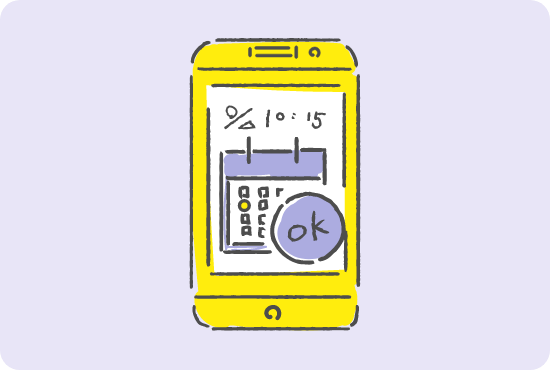
    予約申込

    WEBアプリにログインしたら、ご利用するエリアを選択し、決定をクリックしてください(各エリアの詳細ページ内に、予約申込方法詳細の説明がございますので、併せて確認ください)
    予約申込
  • step
    4

    マッチング

    WEBアプリの「予約確認」にて、予約成立となっているかを確認ください(各エリアの詳細ページ内に、予約一覧確認の説明がございますので、併せて確認ください)

    マッチング
待ち合わせ
  • step
    5

    待ち合わせ

    WEBアプリに表示されている時間までに乗車地点へ向かい、お待ちください。

    待ち合わせ
  • step
    6

    乗車

    乗車時に名前を伝えてください。

    乗車
降車
予約申込の違いについて

予約申込の違いについて

予約申込方法は、事前申込
直前申込があります。

事前申込とは?

前日の12時までの予約が対象です。

  • 乗車希望の7日前から申込可能
  • 優先的にドライバーとのマッチングが行われる
  • 乗車希望日の前日16時以降にマッチングされているかを確認できる
  • 乗合の可能性あり

直前申込とは?

前日の12時以降の予約が対象です。

  • 乗車希望の前日12時以降も予約可能
  • マッチングされる優先順位は低くなる
  • 乗合なし
予約申込方法詳細

※ドライバーの手配が付かず乗車できない場合があります。

予約申込方法詳細

step
1

WEBアプリにアクセス

step
2

WEBアプリで予約申込

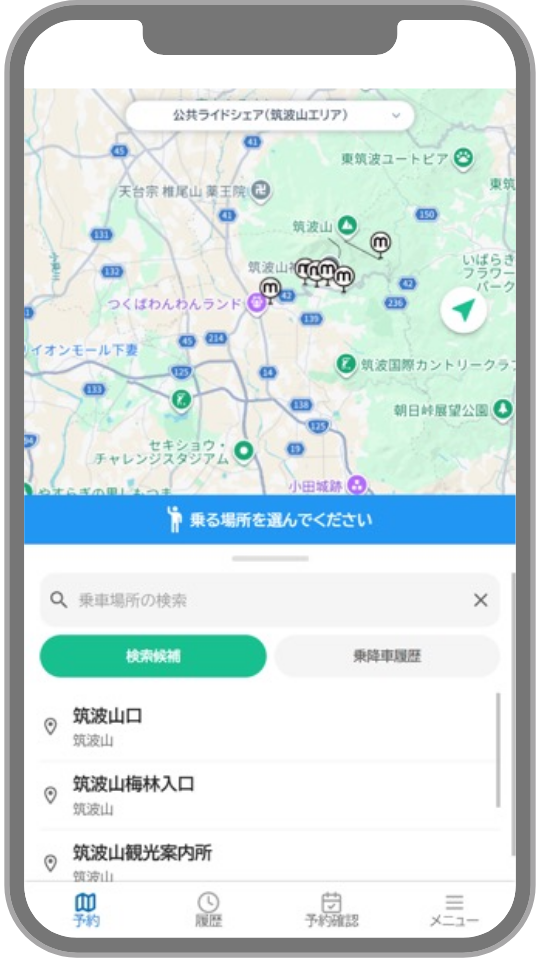
  • ①予約申込乗降場所選択

    ①予約申込乗降場所選択

    MAPのピンまたはキーワード検索から
    乗車、降車の順に場所を選択

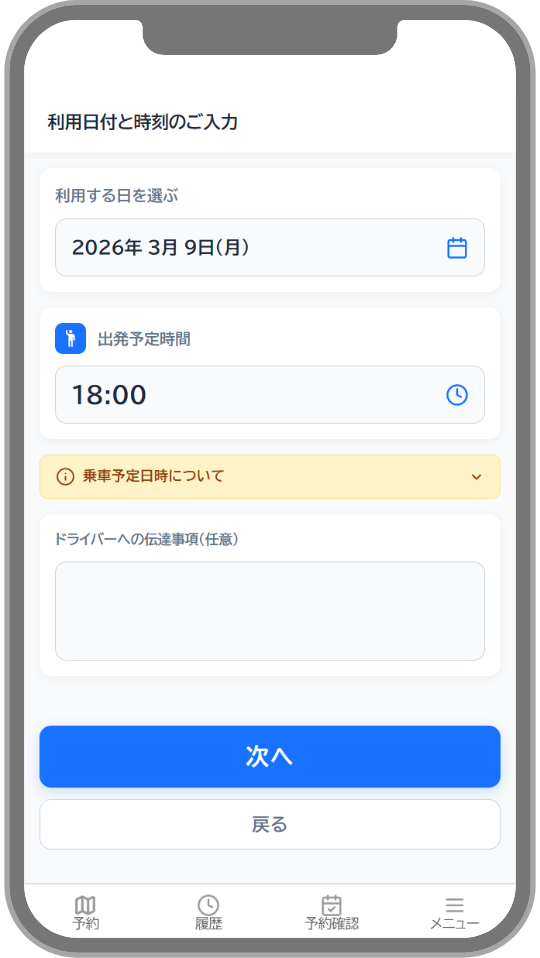
  • ②予約申込の時間・料金確認

    ②予約申込の時間・料金確認

    乗車人数、乗車予定日時、決済方法の確認の順にページが変わるので、それぞれ選択し、「次へ」をクリック
    ※伝達事項がある場合(大きな荷物やベビーカー、車いす持ち込みの場合など)には、その旨を記入
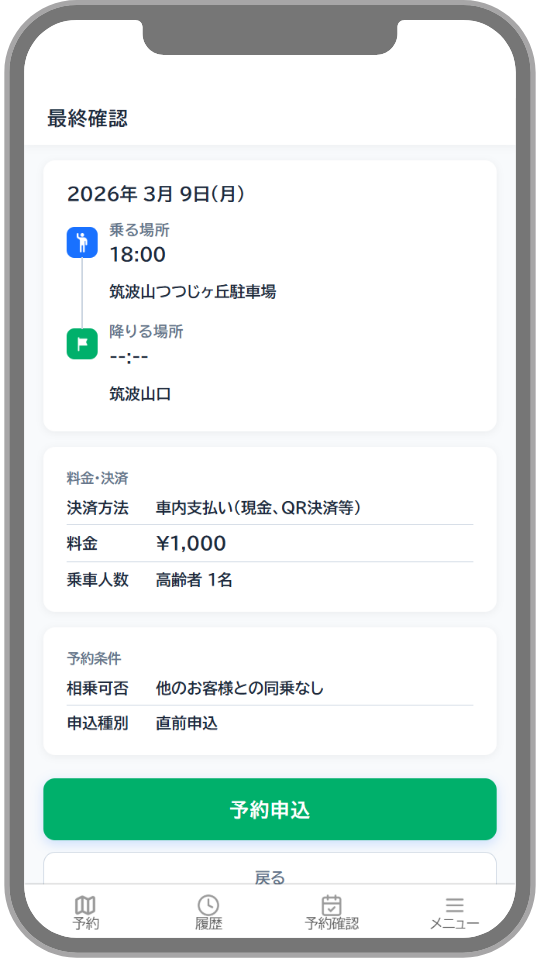
  • ③予約申込完了

    ③予約申込完了

    表示内容を確認し、
    「予約申込」をクリックして予約完了

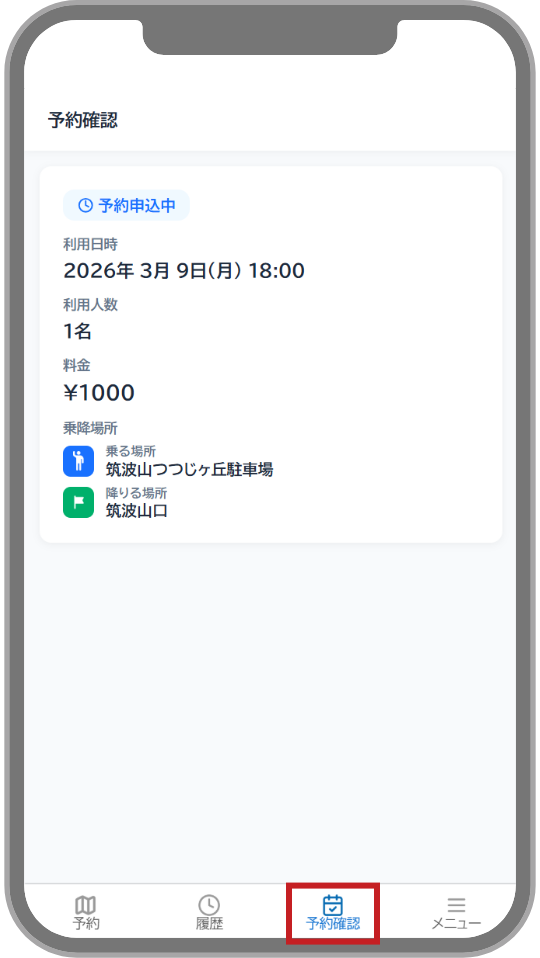
  • ④予約一覧確認

    ④予約一覧確認

    乗車予定日前日の16時以降に
    下部「予約確認」をクリック。
    申込内容が表示されるので、
    「予約成立」となっているかを確認
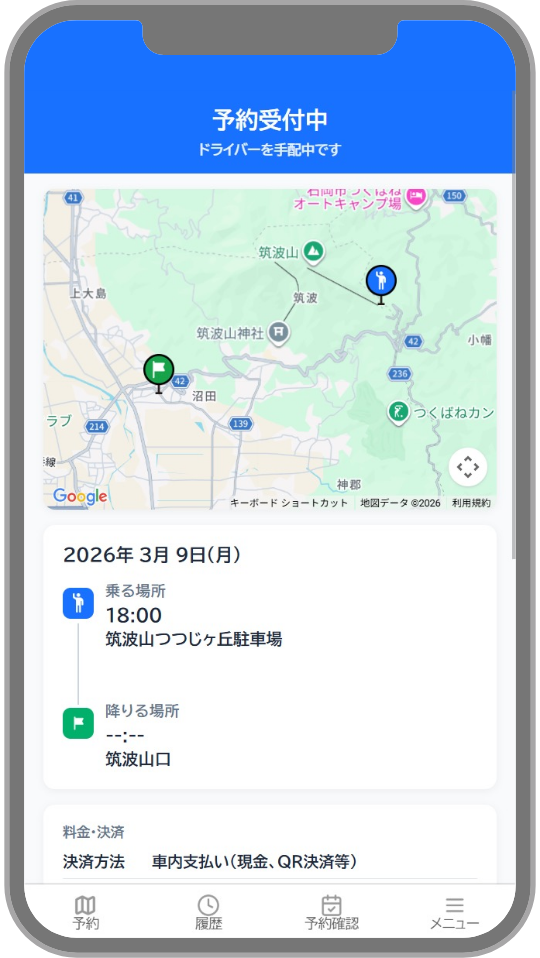
  • ⑤予約詳細確認

    ⑤予約詳細確認

    予約確認のページから申込内容をクリックし、
    「詳細情報」を確認。
    「乗車予定日時」を確認し、表示されている時間までに乗車地点へ向かう

  • 日本語
  • English

地域連携公共ライドシェアご利用の注意 地域連携公共ライドシェア
ご利用の注意

【予約申込に関する注意事項】

  • 運行エリアごとに設定された乗降ポイント以外の場所で、乗車及び降車することはできません。
  • 運行エリアごとに設定された時間以外に利用することはできません。
  • 予約申込の状況等により、ご希望の時間に予約できない場合があります。
  • 予約申込後、前日16時までは、乗合などにより乗車予定日時が変更になる場合があります。前日16時以降に再度WEBアプリをご確認ください。
  • 車いす、ベビーカー、大きな荷物等がある場合、または盲導犬や介助犬等が乗車する場合は予約の際に伝達事項にその旨を必ずご記入ください。伝達事項にご記入がない場合、乗車をお断りすることがあります。なお、荷物等の大きさによっては、車内にお持ち込みいただけない場合があります。
  • 予約した利用者区分及び乗車人数は、原則変更できません。利用者区分又は乗車人数が予約内容と異なる場合、乗車をお断りすることがあります。

【利用に関する注意事項】

  • 複数の方と乗合になる場合があります。
  • 乗降ポイントには、原則、停留所等の目印となるものはありません。
  • 途中下車や乗車後の降車ポイントの変更はできません。
  • 乗降ポイントには、時間に余裕をもってお越しください。他の利用者の予約に影響するため、乗車予定日時から1分が過ぎても予約された利用者が乗降ポイントにお見えにならない場合は、キャンセルとみなして出発することがあります。
  • 乗車後は、安全保持のため、乗務員の指示に従ってください。乗務員の指示に従っていただけない場合、降車いただくことがあります。
  • 利用者の荷物や身の回り品等の紛失又は損傷に関して、実施主体及び乗務員は、原則その責を負いません。
  • 以下の場合は、利用することができません。
    • 一人で乗車及び降車ができない方(介助者が同乗すれば利用可能)
    • 未就学児のみの利用(運賃を支払って乗車する同伴者が同乗すれば利用可能)
    • ケージに入れていないペットをつれての利用(盲導犬や介助犬等を除く)
  • 運行に支障をきたす行為(直前及び無断キャンセル、他の利用者への迷惑行為など)が繰り返される場合、その後の利用をお断りすることがあります。
  • 利用者の故意又は過失により事故等が発生した場合、これに係る一切の責任は利用者が負うことになります。

【運行に関する注意事項】

  • 天候や交通の事情等で、やむを得ず遅れる場合や、運行を休止する場合があります。
  • 乗合により、目的地への到着が遅れる場合があります。

【車両に関する注意事項】

  • 車内での飲食及び喫煙はご遠慮ください。
  • 利用者の故意又は過失により車両又はその設備を汚染又は損傷させた場合は、利用者の費用負担により原状回復していただきます。
  • 車内に忘れ物があった場合、最寄りの交番又は警察署に届けます。忘れ物に関するお問い合わせは、カスタマーサポート(050-2030-2626)までご連絡ください。

【Cautions regarding reservation applications】

  • It is not possible to start or end a ride at places other than the boarding and alighting points set for each service area.
  • It is not possible to use a ride outside of the hours set for each service area.
  • Depending on factors such as the situation of reservation applications, it may not be possible to make a reservation for the desired time.
  • After a reservation application is made, it may be that the scheduled time for the boarding is changed up until 16:00 on the day before the ride, such as due to the situation of other passengers boarding. Please check the web app again at some time after 16:00 on the day before the ride.
  • If you have a wheelchair, stroller, or large luggage, etc., or if you have a guide dog or service dog, please be sure to enter that information in the matters to be communicated when making the reservation. The boarding may be refused if such information was not entered in the matters to be communicated. Please note that depending on the size of the luggage, etc., it may not be possible to bring it in the vehicle.
  • As a general rule, it is not possible to change the user category or number of passengers stated in the reservation. Boarding may not be allowed if the user category or the number of passengers differs from the reservation content.

【Cautions regarding use】

  • You may have to share a ride with several people.
  • As a rule, there is no marking (such as a bus stop sign) at the boarding and alighting points.
  • It is not possible to leave the ride before your destination, or to change your alighting point after boarding.
  • Please arrive at your boarding point with plenty of time to spare. To avoid affecting the reservations of other users, if the user with a reservation has still not arrived at the boarding point when one minute has passed after the planned time of boarding, the reservation may be considered cancelled and the vehicle may depart.
  • After boarding, to maintain safety, please follow the instructions of the crew. If you do not follow the instructions of the crew, you may be asked to get off.
  • In principle, the implementing body and the crew shall not be responsible if the luggage or personal belongings of a user are lost or damaged.
  • It is not possible to use this service in the following cases.
    • If the passenger is unable to board and alight the vehicle alone (Use is possible if such a passenger is accompanied by a caregiver)
    • Use by unaccompanied preschool children (Use is possible if accompanied by a fare-paying passenger)
    • Use with uncaged pets (excluding guide dogs and service dogs)
  • If you repeat an act that interferes with the service (such as cancellation at the last minute or without notice, or causing nuisance to other users), we may refuse your use in the future.
  • In the event that an accident, etc., occurs as a result of an intentional act or negligence of the user, the user shall bear all responsibility for the accident.

【Cautions regarding operation】

  • Unavoidable delays or the suspension of operations may occur due to the weather or the traffic conditions, etc.
  • The arrival at the destination may be delayed due to other passengers boarding.

【Cautions regarding the vehicle】

  • Please refrain from eating, drinking and smoking in the vehicle.
  • If the vehicle or its equipment is dirtied or damaged as a result of an intentional act or negligence of the user, it shall be restored to the original state at the user's expense.
  • If a passenger leaves something in a vehicle, it will be taken to the nearest police box or police station. For inquiries about lost items, please contact Customer Support at 050-2030-2626.